What Is a Face Recognition System?
Introduction
A face recognition system uses cameras and face recognition software to detect a face, convert it into a numerical template, and match it against enrolled people to verify who they are or identify them. Businesses use it for access control, attendance and security monitoring, because a face cannot be lent, lost or shared like a card or PIN.
Teams evaluating Katomaran's face recognition system often start with camera placement and enrollment quality, not with marketing accuracy claims.
Why Do Cards and PINs Fail at Identity?
A proximity card proves that a card reached the reader. It says nothing about who was holding it. That gap shows up in ordinary operations, long before it shows up in a breach:
- Cards get shared between shifts
- A contractor keeps a card that should have been returned months ago
- Someone forgets theirs and a colleague waves them through
- At the attendance register, one person signs for three
PINs have the same weakness and travel more easily. Manual checks at a gate depend on a guard recognising faces across a shift, which works for forty regular staff and fails at four hundred. A face recognition system changes what the credential is. The face is presented, matched against an enrolled template, and the result names a person. For access, attendance, and security monitoring, that shifts the question from what was presented to who was present.
Verification vs Identification: The Two Modes
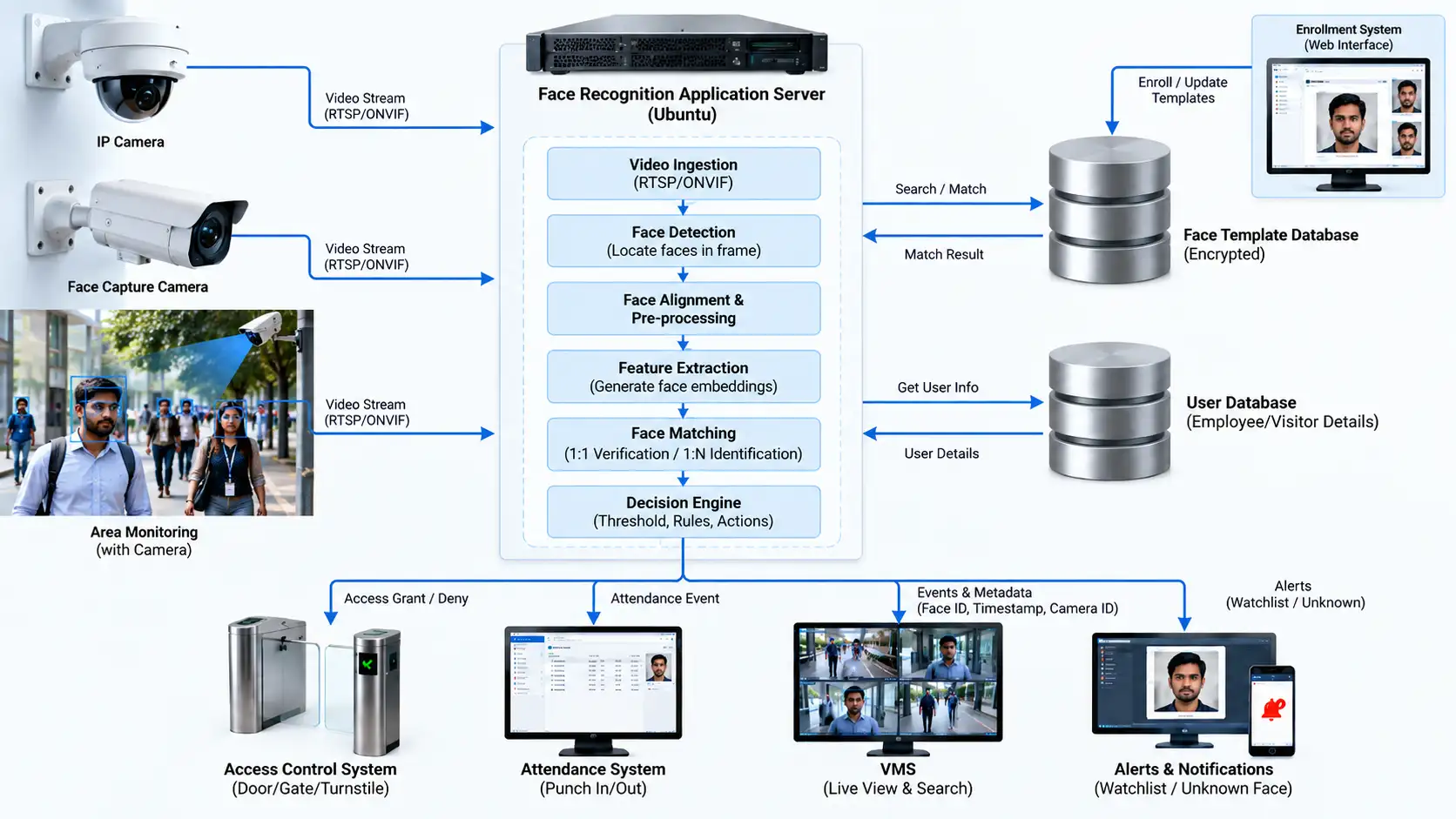
From a systems view, a face recognition system is cameras plus software that locates faces in an image, converts each face into a numerical template, compares that template against enrolled templates, and returns a result. This is often called a facial recognition system. The two main types are verification (one-to-one) and identification (one-to-many), summarised below.
| Criteria | Verification (one-to-one) | Identification (one-to-many) |
|---|---|---|
| What happens | The person claims an identity by tapping a card or entering an ID, and the system confirms the face against that one template | The system searches the face against the whole enrolled database and returns the closest match above a threshold, or no match |
| Difficulty | The easier problem, since there is one comparison | Rises with database size, since more templates mean more chances of a close but wrong match |
| Typical use | Access control, attendance terminals | Watchlist matching, searching recorded video |
What the system stores is a template, not a photograph in the usual sense. The template is a vector derived from facial geometry, and templates are designed to be very difficult to reverse into a usable face image. Facial templates are commonly treated as biometric personal data under India's Digital Personal Data Protection (DPDP) Act, 2023, so consent, purpose limitation, retention periods, and access control belong in the system design; organisations should check obligations with their legal team. Katomaran FRS is built around these two modes, with the threshold and the review path set per site.
How Does Face Recognition Work?
Enrollment. A person's face is captured, usually from several angles, and converted into reference templates stored with their identity record. Enrollment quality sets the ceiling for everything afterwards. A template built from a poorly lit, off-angle capture produces failed matches for as long as it stays in the database.
Detection. In live operation, the software locates faces within the frame and returns a bounding box for each. Detection failing means recognition never gets a chance, which is why camera placement is the first thing to get right.
Feature extraction. The detected face is normalised for pose and scale, then passed through a model that outputs a template. Model quality shows here, and so does variation in lighting and angle.
Matching. The live template is compared against enrolled templates, producing a similarity score. In verification, that is one comparison. In identification, it is a search returning ranked candidates.
Decision output. The score is tested against a threshold. Above it, the system returns a match and triggers an action: a door releases, an attendance punch is recorded, an alert fires. Below it, the system returns no match, and what happens next is a workflow decision, not a technical one.
Reliability is determined at stages one and two. The matching engine is the part most discussed and the part least often responsible when a deployment underperforms.
Core Components
1. Capture Devices and Camera Placement
Face recognition needs three things from the capture point:
- Enough pixels across the face at the working distance
- A frontal or near-frontal view
- Light falling on the face
Those requirements decide placement. Mount at roughly head height, or slightly above with a shallow downward angle, and never high enough to look down at the top of someone's head. A camera facing a glass entrance or an open gate gets backlit faces for part of the day, which is the most common placement error we see. Where ambient light varies, cameras with their own controlled illumination work more consistently than cameras depending on the room.
Throughput also shapes placement. A gate where fifty people arrive in two minutes needs a capture point that works while they keep walking, which is a different design from a reception desk where one person stands still.
2. Enrollment and Template Management
Enrollment is an administrative process more than a technical one, and it needs discipline:
- Capture under lighting similar to where recognition will happen
- Several angles per person, so pose variation at the door has a reference to match
- A defined quality check, with re-enrollment where capture is poor
- Re-enrollment after significant appearance change
- Removal on exit, as part of the offboarding checklist
That last point causes the most trouble. A database holding templates for people who left two years ago is both an access risk and a search burden. Removal belongs in the HR exit process, with periodic reconciliation against the active roster.
3. Matching Engine and Thresholds
The threshold is the central operational control, and it sets a trade-off that cannot be avoided.
| Threshold | False accepts | False rejects | Suits |
|---|---|---|---|
| Higher | Fewer | More, so genuine staff get turned away | Server rooms, stores, high-value areas with a staffed fallback |
| Lower | More | Fewer, so people pass smoothly | Canteen and attendance terminals, where a queue costs more than a wrong match |
The right setting depends on what the match authorises. Setting one threshold across every reader in a plant guarantees it is wrong somewhere.
4. Liveness and Anti-Spoofing Measures
Without liveness checks, a photograph on a phone screen can satisfy a matcher. The common methods:
- Texture analysis, which looks for the surface signature of a screen or print
- Depth sensing, which confirms a three-dimensional face
- Infrared response, which a printed image does not reproduce
- Challenge-response, such as a blink or a head turn
The trade-off is throughput against assurance. Challenge-response is harder to defeat and slows every entry, which matters at a shift-change gate. Passive methods are faster and need good capture conditions to work well. Our article on face liveness in FRS goes through the options in detail.
5. Integration with Access Control, Attendance, or Watchlist Systems
Recognition on its own produces a match event. The value comes from what receives it: a door controller, an attendance or payroll system, a visitor management workflow, or a watchlist alert in the control room.
Three integration details decide whether the deployment holds up:
- Latency. The access controller needs the match within the time a person expects a door to open
- Deduplication. Three detections at one gate should not become three attendance records
- Audit logging. Every match, non-match, and manual override belongs in the log, the point our article on replacing cards without losing auditability develops further
What Affects Face Recognition Accuracy?
Accuracy figures published by vendors come from benchmark datasets under controlled conditions. Field performance is set by the site.
| Factor | What degrades it | What addresses it |
|---|---|---|
| Lighting | Direct sun through a doorway, a bright window behind the subject, unlit corridors at night | Controlled illumination at the capture point |
| Angle | Faces turned away from the camera, approaches that cross the field of view | Placement where people walk toward the camera |
| Distance | Too far gives too few pixels; too close crops or distorts | A defined working range, held by floor markings or a turnstile |
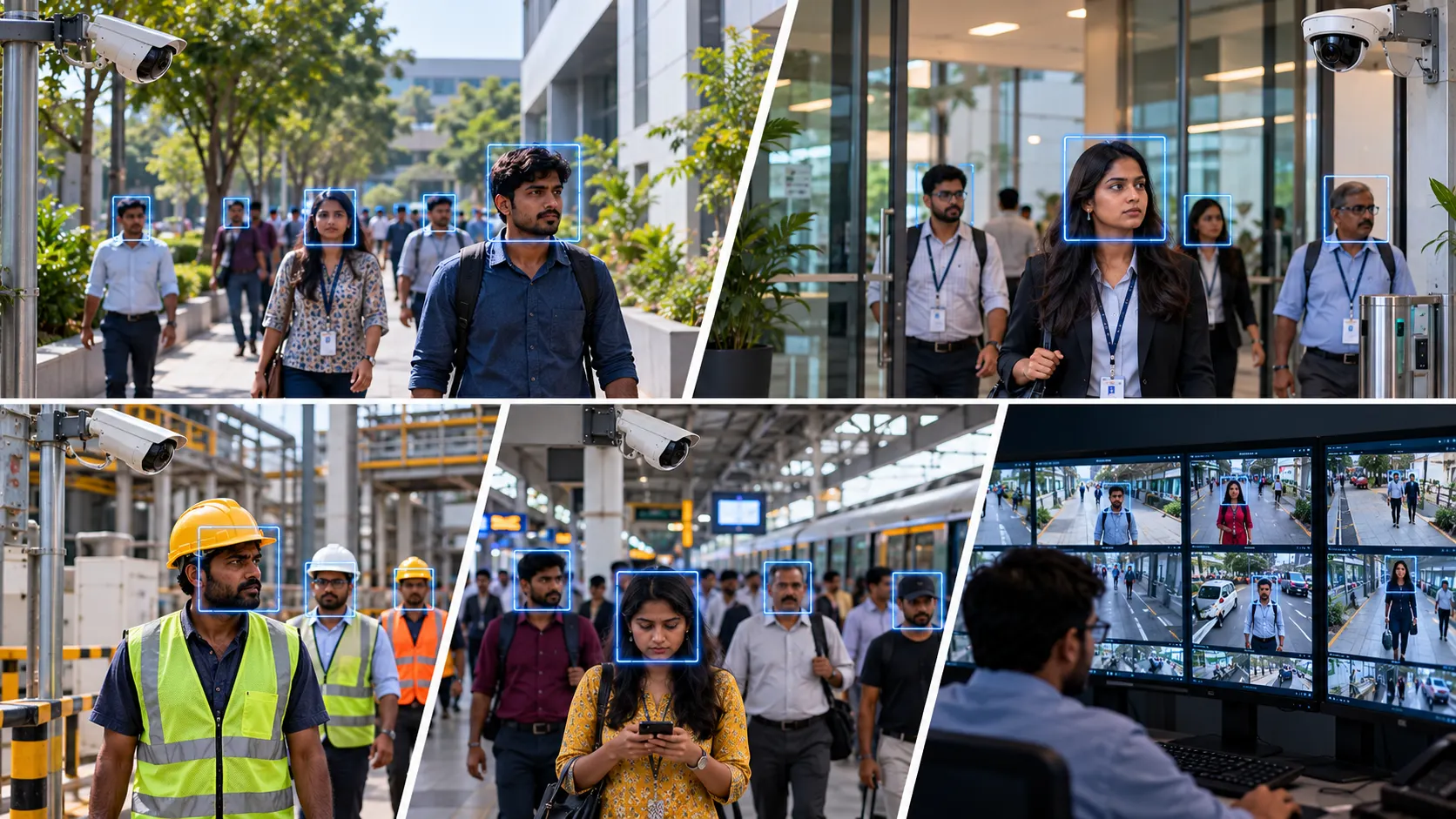
| Occlusion | Masks, helmets, heavy spectacles, dupattas | Capture point and threshold designed around the site's mandatory PPE |
| Image quality | Motion blur, compression artefacts, a dirty lens | Shutter settings for walking speed, and a cleaning schedule |
| Database hygiene | Duplicate records, stale templates, poor enrollments | Periodic review of enrollment quality scores and roster reconciliation |
Lighting is the dominant factor of the six. Taken together, site survey and enrollment discipline account for more field accuracy than the choice of matching model.
What Are Face Recognition Systems Used For?
Common benefits include stronger person-level audit trails, less buddy punching, contactless entry, and faster investigation when face events link to video. For industry-by-industry patterns, see our roundup of top facial recognition system use cases.
Access Control at Gates and Restricted Areas
Face recognition access control at main gates, production areas, server rooms, and stores. The gain over cards is that the credential cannot be lent, and the record names a person. Our comparison of face recognition against traditional access cards covers the operational differences.
Attendance and Time Tracking
Shift attendance without buddy punching, with records flowing to payroll. Throughput governs the design, since a single terminal for several hundred workers at shift change creates a queue, and queues create workarounds. Our article on face recognition attendance management covers the configuration.
Watchlist and Alert Matching
Matching faces in a camera feed against a defined list, used for persons of interest or previously barred visitors. This runs in identification mode against a small list, and it always routes to an operator for confirmation, since the consequence of acting on a wrong match is serious.
Visitor and Contractor Verification
Enrollment at reception with a time-bound template, so access expires with the visit or the contract. For contractors, this pairs usefully with document checks, and expiry removes the recurring problem of credentials outliving the engagement.
Integration with Broader Video and Security Platforms
Face events appear as alarms in the video management system alongside other detections, with the clip attached. The same feed can also drive AI video analytics events, so face matches sit next to intrusion or PPE alerts in one workflow. This gives an investigator a searchable identity event, which is a different starting point from hours of footage.
What Happens When Face Recognition Matches or Fails?
A match needs no operator attention. The door opens, the punch records, and the event logs. Operations should be quiet when the system is working.
Non-matches are where workflow design matters. Every site needs a defined fallback, which is normally one of:
- A guard with a verification procedure
- A card or PIN as a secondary credential
- A supervisor override
Without one, a staff member whose template has degraded stands at a gate with no way in, and within a week someone has propped the door open.
Watchlist alerts follow a different path. The operator sees the live frame, the enrolled image, and the similarity score, then confirms or dismisses. The score is information for a human judgment, and treating it as a verdict is how wrongful detentions happen.
Three things keep the system accountable:
- Overrides are logged with an operator identity and a reason
- Repeated non-matches for the same person trigger re-enrollment, so the guard stops absorbing the problem
- HR owns the enrollment and removal process, because security teams rarely know who joined or left this week
What Are the Limits of Face Recognition?
Handled reliably today:
- Verification under good capture conditions, with cooperative subjects at a known distance
- Identification against a modest enrolled database at a controlled capture point
- Attendance and access control, which sit comfortably inside what the technology does well
Still difficult:
- Recognition at a distance in crowds
- Significant pose variation, and partial occlusion
- Identical twins, which remain a known limitation
Vendor figures from benchmark conditions do not transfer to a gate in afternoon sun.
Ongoing work in any serious deployment:
- Human review for anything consequential, particularly watchlist matches
- Monitoring of both error rates, since a rising false reject rate usually points to enrollment or capture degradation, and false accepts need investigation whenever they surface
- Template hygiene: enrollment quality review, removal on exit, and roster reconciliation
Privacy obligations are part of the engineering. Biometric templates are personal data, which means consent at enrollment, a stated purpose, a retention period, access restricted by role, and audit trails on who viewed or exported what. Organisations should check obligations with their legal team before scaling enrollment.
Processing can run at the edge on a local appliance, on an on-premise server, or in the cloud. Edge and on-premise keep video closer to the cameras and can cut round-trip delay at a busy gate; cloud suits multi-site rollouts where central monitoring matters more than local hardware. The right mix depends on bandwidth, retention rules, and who must see live alerts.
Conclusion
The engineering value of a face recognition system is a verifiable identity signal. Where a card proves a token arrived, a face match records a person, which is what access logs, attendance records, and investigations actually need.
Whether a deployment delivers that is decided mostly on site: where the cameras sit, what the light does through the day, how people arrive at the capture point, how disciplined enrollment is, and who owns template removal when someone leaves.
At Katomaran, our face recognition system runs on the cameras you already have, at the edge or on-prem, and plugs into our video management system alongside access control, attendance, and VSaaS monitoring. Our models are trained on Indian conditions, from backlit entrances to sites where helmets are routine, and support access, attendance, and watchlist matching across campuses, plants, and offices.
See face recognition working on your own cameras. Book a demo with our team.
Frequently Asked Questions
Can a face recognition system be fooled by a photograph?
Without liveness detection, yes. Liveness checks using texture, depth, infrared response, or a blink challenge are what prevent it. We treat liveness as a requirement wherever a match authorises access.
How many cameras does a site need for face recognition?
One capture point per controlled entry, sized for throughput at peak. A gate with hundreds of workers at shift change needs more lanes than a reception desk, since queues create workarounds that defeat the system.
Does it work when people wear helmets or masks?
Partially. Recognition from the lower face alone is a harder problem and accuracy drops. On sites where helmets are mandatory, we design the capture point and threshold around that constraint during the survey.
What happens when the system fails to recognise someone?
A defined fallback handles it: a secondary credential, a guard verification procedure, or a supervisor override, all logged. Repeated failures for one person should trigger re-enrollment before they become a daily workaround.
Is facial recognition more accurate than fingerprint?
Each suits different conditions. Face recognition works without contact and at a distance, which helps throughput. Fingerprint performs better where capture conditions are poor, though it struggles with worn or wet hands in industrial work.
What is the difference between face detection and face recognition?
Face detection finds a face in an image or video frame and returns a location. Face recognition goes further: it turns that face into a template and matches it to enrolled people for verification or identification.
How accurate is a face recognition system, and what about bias?
There is no single accuracy number that transfers from a lab set to a working gate. Field results depend on lighting, angle, enrollment quality, and thresholds, and performance can vary across populations and capture conditions, so sites should test with their own cameras and people.
What is face recognition software?
Face recognition software is the layer that detects faces, builds templates, and scores matches against an enrolled database. Cameras supply the frames; the software makes the identity decision and can hand that event to access control, attendance, or a VMS.

Caldwell Simon
Project Head
Caldwell Simon, Project Head at Katomaran Technologies, writes on AI video analytics, VMS, IoT integration, and large-scale surveillance deployment and delivery.