Introduction
Perimeter security in a large industrial campus is a different game compared to a small office or retail site. You’re dealing with long boundary walls, multiple gates, open yards, low-light zones, and high-value areas spread across acres. Traditional CCTV helps you record incidents—but it often fails at the most important part: detecting threats early and triggering fast action.
That’s where AI video analytics changes the outcome. Instead of relying on humans to constantly watch dozens (or hundreds) of camera feeds, video analytics turns perimeter cameras into real-time detection and alert systems—helping security teams respond faster, reduce blind spots, and maintain stronger control across the campus.
What Perimeter Security Means in Industrial Campuses
In industrial environments, “perimeter” is not just the fence line. It includes everything that controls entry, movement, and access to critical zones, such as:
Boundary walls, fences, and buffer zones
Entry/exit gates and boom barriers
Loading bays, warehouses, material yards
Substations, fuel storage areas, data rooms, restricted buildings
Outer roads, parking zones, and open grounds
The risk is also broader than simple trespassing. Industrial campuses face:
Unauthorized entry and theft attempts
Insider-driven movement into restricted zones
Tampering with assets, cables, or equipment
Suspicious activity near gates, yards, and “quiet corners”
Night-time intrusions when visibility is low
A modern perimeter strategy needs early detection + verification + evidence, not just video storage.
The Limitations of Traditional Perimeter Security
Most industrial campuses still depend on a mix of CCTV + guards + basic sensors. While this setup is common, it has predictable weaknesses:
1) Too Many Cameras, Not Enough Attention
Control rooms often monitor large camera counts with limited staff. Even the best teams can’t watch every screen continuously—especially during long shifts.
2) Delayed Detection
CCTV gives visibility, but if no one notices a threat immediately, the response becomes late. In perimeter incidents, minutes matter.
3) False Alarms From Basic Sensors
Motion sensors or beam sensors may trigger frequent false alerts due to: animals, wind, rain, moving vegetation, headlights, reflections, shadows, environmental noise. Too many false alarms reduce trust in the system and increase “alarm fatigue.”
4) Poor Night / Fog Performance Without Smart Setup
Low-light conditions and harsh weather reduce visibility and make manual monitoring harder—exactly when many perimeter incidents occur.
5) Weak Incident Proof & Audit Trail
Even when an event is caught, many setups don’t provide a clean workflow for:
evidence clips
incident logs
searchable history
reporting for compliance or investigations
Where Video Analytics Fits: From CCTV to “Actionable Security”
Video analytics adds intelligence on top of your existing camera infrastructure. Instead of cameras acting like passive recorders, analytics enables them to behave like real-time sensors that detect and alert.
A good video analytics perimeter system typically delivers:
Real-time detection (human/vehicle/object events)
Rule-based alerts (per camera, zone, schedule)
Instant verification (snapshot + short event clip)
Escalation workflows (control room → supervisor → patrol)
Event logs (audit-friendly incident history)
And importantly for industrial environments, it can be deployed as on-premise/edge, keeping data within your site network when needed.
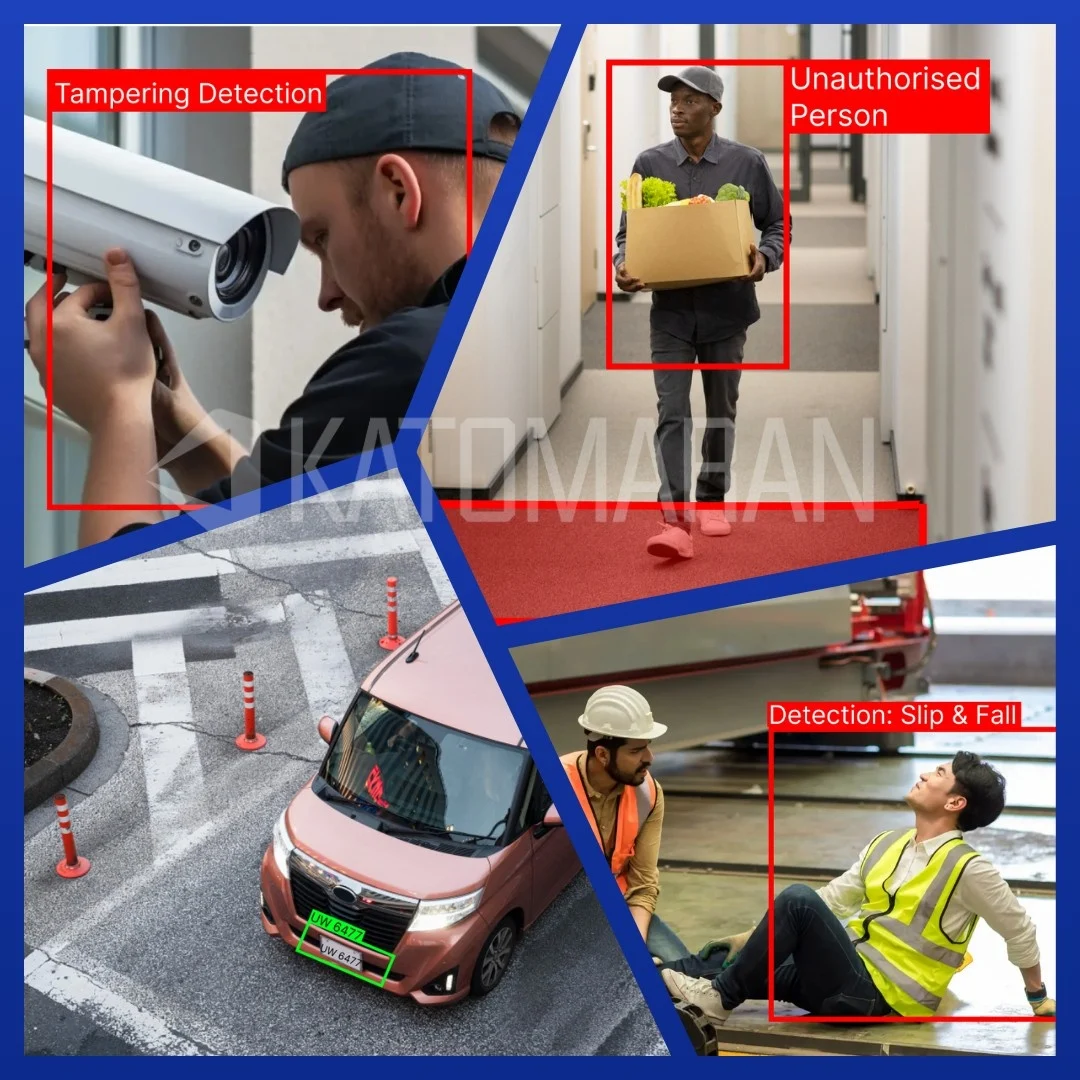
Key Video Analytics Modules for Perimeter Protection
Below are the most effective analytics modules used in perimeter deployments for large industrial campuses.
| Module | What it Detects | Why it Matters | Best Use Areas |
|---|---|---|---|
| Intrusion Detection (Restricted Zone Entry) | Detects when a person enters a defined restricted area (fence buffers, warehouse perimeters, substation zones, no-go yards). | More reliable than generic motion detection because it focuses on human intrusion, not random movement. | Fence-line buffer zones, warehouse edges, critical utility areas. |
| Line Crossing / Virtual Fence | Triggers an alert when a person or vehicle crosses a digital line in a restricted direction or time window. | Ideal for long perimeters because you can apply precise crossing logic and schedules. | Boundary walls, approach roads, restricted corridors, after-hours monitoring. |
| Loitering Detection (Suspicious Presence) | Detects when a person stays in a zone longer than a set time (blind corners, gates, isolated zones). | Helps stop incidents early—loitering often indicates testing or targeting before intrusion. | Gate approaches, corners, isolated fence segments, loading zones after hours. |
| Object Removal / Theft Detection (Yards & Storage Zones) | Detects suspicious object movement or removal, unattended object events, or activity around stored assets. | Prevents opportunistic industrial theft and captures evidence clips during attempts. | Material yards, cable or drum storage, scrap yards, outdoor inventory areas. |
| Vehicle Analytics (Unauthorized Entry & Abnormal Movement) | Detects unauthorized entry, wrong-way driving, lane violations, illegal parking, and optional number plate recognition. | Gates and internal roads are high-risk; vehicle alerts reduce escalation time and improve control. | Entry or exit gates, internal roads near restricted buildings, loading areas. |
| Camera Tamper & Health Monitoring | Detects cameras being covered, moved, defocused, offline or disconnected, affected by glare or low visibility, or tampered. | Protects perimeter reliability—attackers often disable cameras first; early alerts prevent blind spots. | All perimeter cameras, especially remote poles and fence-line cameras. |
Alert-to-Action Workflow: How It Works on the Ground
The real value of video analytics is not only detection—it’s how fast the system converts detection into action.
A practical workflow looks like this:
Detect: Analytics identifies intrusion/line crossing/loitering/vehicle violation
Verify: The operator sees an instant snapshot and short clip
Decide: Operator validates event severity (real threat vs harmless activity)
Dispatch: Patrol team is notified through app/command center workflow
Record: Event is logged with time, camera, evidence clip, and remarks
Review: Supervisors can audit incidents and tune rules for better accuracy
This approach supports exception-based monitoring—operators focus on alerts, not endless live viewing.
Camera Placement & Design Best Practices for Large Campuses
Analytics performance depends heavily on camera placement. Here are practical rules that work in industrial perimeter layouts:
Fence-Line Coverage Strategy
Place cameras to cover approach paths, not only the fence itself
Avoid extreme wide angles that make targets tiny at long distance
Overlap critical sections to reduce blind spots at corners and gates
Gate Coverage Strategy
Gates need layered coverage:
wide view for overall activity
focused view for face/vehicle identification if required
lighting support for night-time clarity
Lighting & IR Considerations
Ensure consistent illumination; uneven lighting causes missed detections
Use IR carefully—avoid overexposure and “white-out” reflections
In some sites, thermal cameras are used for long-range night detection (optional upgrade)
Fixed vs PTZ Cameras
Fixed cameras provide consistent analytics zones (best for detection)
PTZ is useful for manual tracking and verification, but analytics is strongest on stable views
A hybrid approach often works best: fixed cameras for detection + PTZ for response verification.
Integrations That Make Perimeter Security Stronger
Video analytics becomes far more powerful when integrated with existing security systems:
VMS Integration
Operators can jump from alert → live view → playback instantly
Evidence is linked to timeline and camera IDs
Multi-site monitoring becomes easier
Access Control / Boom Barrier / Gate Systems
Correlate gate open events with camera alerts
Detect tailgating or gate violations
Track unauthorized entry patterns
Siren / PA / Strobe Alerts (Optional)
For high-risk zones, alerts can trigger:
sirens
public address warnings
flashing beacons
This creates immediate deterrence without waiting for patrol arrival.
SOC / Command Centre Dashboards
Dashboards support
heatmaps of repeated alert zones
incident trends by time and location
Supervisor reporting and audit readiness
Conclusion
Large industrial campuses don’t fail at perimeter security because they lack cameras—they fail because humans can’t watch everything all the time. Katomaran Technologies’ AI Video Analytics transforms your perimeter from passive CCTV into an active detection and response layer—helping security teams focus on real threats, react faster, and maintain stronger control across gates, fences, yards, and restricted zones.
If you’re planning a perimeter upgrade, start with a targeted pilot on your most vulnerable zones—then scale with clear SOPs, tuned AI rules, and seamless integration with your existing CCTV/VMS infrastructure. Katomaran Technologies helps you deploy scalable, on-premise ready perimeter intelligence that delivers real-time alerts, evidence, and operational visibility across your entire campus.

Dinesh Kumar
SEO Analyst
Dinesh Kumar is an SEO Analyst at Katomaran Technologies, writing search-optimized content on AI video analytics, VMS, intelligent surveillance, and IoT-driven technology solutions.