Introduction
Most organizations don't set out to build a fragmented surveillance estate. It happens one site at a time a new warehouse gets its own DVR, a new branch gets whatever the local integrator installed, a new factory floor gets a different vendor's NVR because that's who was available that quarter. Ten sites in, security operations are running ten separate systems with ten separate logins, and nobody can answer a simple question: what happened across all our locations in the last hour, from one place.
The Operational Challenge of Distributed Camera Networks
Each disconnected DVR or NVR is a closed system. It stores its own footage, enforces its own user accounts, and exposes its own web interface, usually reachable only through a specific port forward or VPN tunnel into that site's local network. An operator investigating an incident that touches two locations has to log into two systems, in two different interfaces, often running two different firmware versions, and manually correlate timestamps between them.
This gets worse as sites are added. IT and security teams inherit whatever camera vendor the local contractor used, whatever storage capacity was budgeted at install time, and whatever firmware happened to ship that year. There's no consistent retention policy across locations, no single audit log of who accessed which footage, and no way to push a configuration change a new user, a new alert rule, a firmware patch to every site at once. Camera coverage exists everywhere; operational visibility exists nowhere in particular.
What Multi-Site VMS Centralization Actually Means
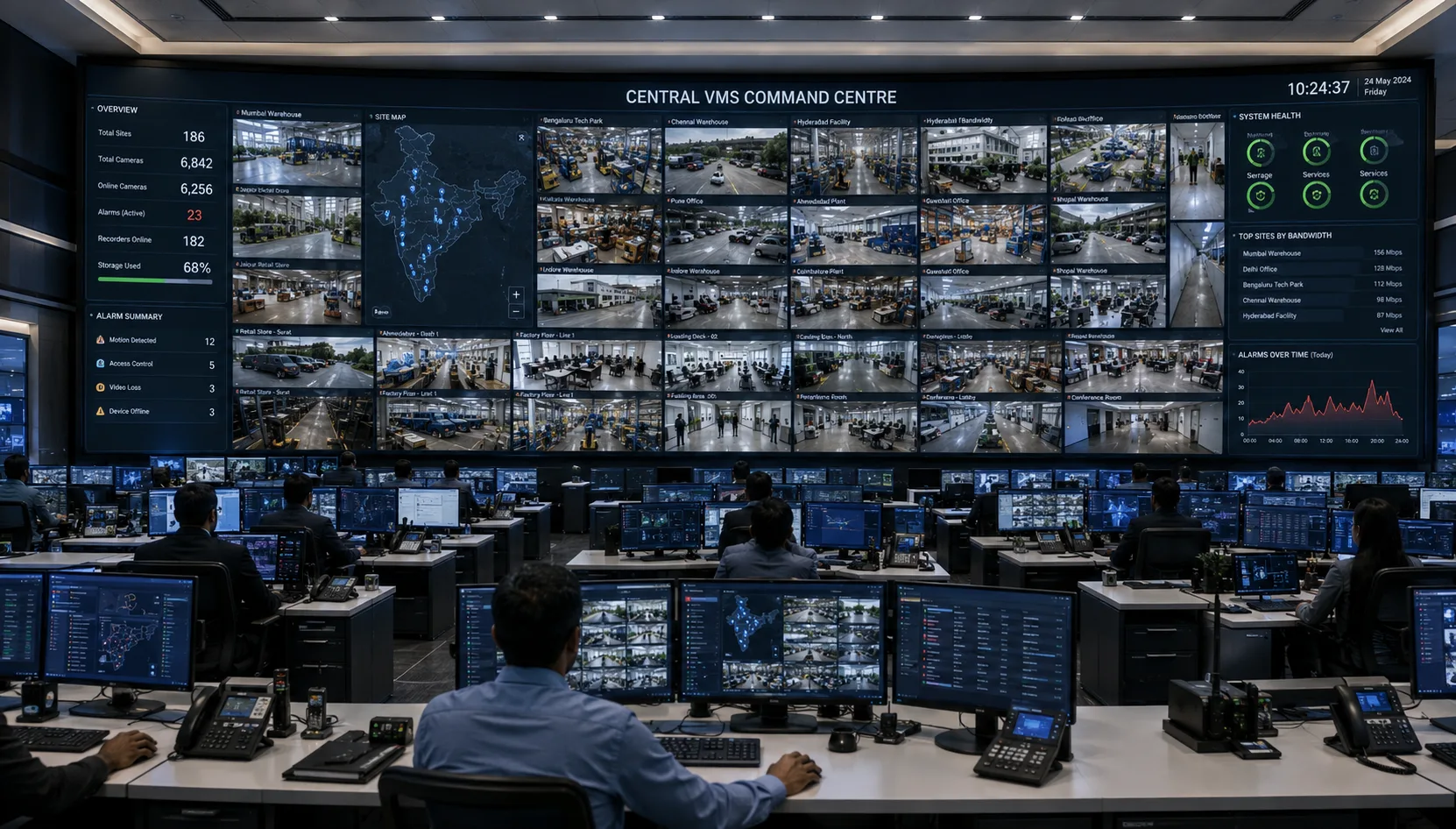
Multi-Site VMS Centralization brings live feeds, recorded video, alerts, device health, and user management from every location into a single platform with one login and one operational view. Operators see all sites or the subset they're authorized for through one interface, and administrators manage cameras, users, and policies once instead of per site.
It helps to separate two things that often get conflated: control-plane centralization and data-plane centralization. Control-plane centralization means a single system manages configuration, users, alerts, and search across sites. Data-plane centralization means the video itself is streamed and stored in one place. Most workable multi-site deployments centralize the control plane fully while keeping recording distributed at the edge, at least in part. A centralized video management system built this way gives a single control room the ability to manage every site without forcing every camera's raw stream to travel to a central data center around the clock.
Architecture Options for Different Scales
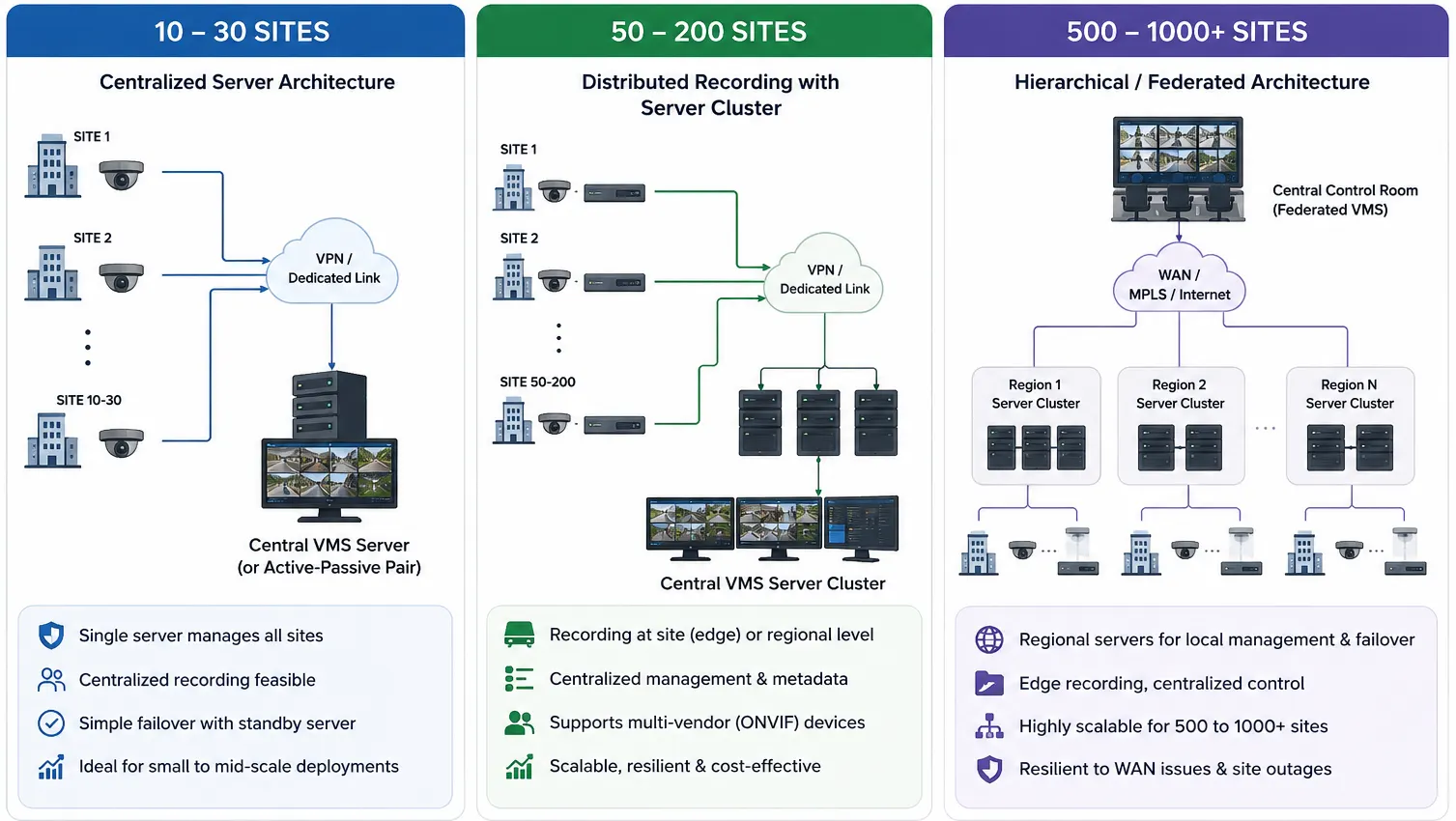
Choosing a VMS for multiple sites means selecting an architecture that fits the actual scale, not applying one template everywhere. The right enterprise VMS architecture at ten sites looks nothing like the right one at a thousand different server topologies, storage strategies, and assumptions about network reliability.
Small Scale: 10–30 Sites
A single VMS server, or a small active-passive pair for redundancy, can usually manage the full control plane and a meaningful share of the recording load at this scale. Sites connect back to headquarters over site-to-site VPN or dedicated links, and centralized recording is often practical if per-site camera counts are modest and bandwidth is adequate.
Failover is straightforward here: a standby server picks up if the primary goes down, and a short recording gap during failover is usually tolerable. This is also the scale where many Indian deployments branch offices, retail chains, small campus networks begin, often on infrastructure that was never planned for centralization from day one and gets retrofitted once the number of disconnected systems becomes unmanageable.
Medium Scale: 50–200 Sites
Single-server architectures stop working cleanly somewhere in this range. A server cluster or load-balanced group becomes necessary, both for the volume of concurrent operator sessions and for the database load of managing users, cameras, and events across dozens of locations. Storage strategy has to shift too pulling every camera's full-resolution stream to a central data center around the clock is rarely justified by bandwidth or cost, so recording typically stays local or regional, with the central platform indexing metadata and pulling specific clips on demand.
Camera fleets at this scale are almost always multi-vendor, since sites were onboarded over years by different integrators. ONVIF compliance becomes a real requirement rather than a nice-to-have; standardizing on it early avoids a slow accumulation of proprietary integrations that each need separate maintenance. Enterprises managing distributed operations across factories run into this exact pattern; see how a manufacturing environment handles centralized monitoring across multiple plants for a closer look.
Large Scale: 500–1000+ Sites
A flat architecture every camera talking directly to one central server doesn't hold up under normal network conditions, let alone Indian last-mile realities, at this scale. The workable pattern is hierarchical: cameras record at the edge or to regional aggregation points, regional servers handle local management and failover, and the central control room federates across regions rather than proxying every stream itself. Operators at the top level see live views, receive alerts, and pull recorded clips on request, but the bulk of continuous recording traffic never has to cross the WAN.
Database and metadata scaling becomes its own discipline at this point: user permissions, camera inventory, and event logs for a thousand-site estate are a genuinely large data problem, separate from video itself. Hybrid architectures, where some sites stay fully on-premises and others rely on cloud-based recording and access, are common here, particularly for newer or smaller sites where local server hardware isn't cost-justified. Organizations weighing where on-premise control ends and cloud takes over should look at how VMS and VSaaS compare across site profiles, and how a VMS deployed across large enterprises is typically structured.
Key Technical Building Blocks
Regardless of scale, a handful of technical decisions determine whether a multi-site VMS actually holds up in production.
Recording and Storage Strategy
Recording location is the first real decision: at the edge, centrally, or split between the two with a local buffer that syncs to central storage once bandwidth allows. Store-and-forward recording locally first, then pushing to central storage in the background, is often the only design that survives Indian network conditions, where last-mile connectivity at a given site can be intermittent regardless of how well the central infrastructure is built.
Retention policy should vary by site criticality and camera role rather than following one blanket number across the estate. A perimeter camera at a warehouse gate and an internal corridor camera at a low-traffic office rarely need identical retention. Tiered storage: recent footage on fast local storage, older footage moved to cheaper archival storage keeps cost proportional to actual retrieval patterns.
Bandwidth and Network Design
Live viewing and recording draw from separate bandwidth budgets, and conflating them is a common design error. A camera can record locally at full resolution and frame rate while sending a lower-bitrate sub-stream for live viewing. Most cameras and encoders support this natively, and using it properly is often the difference between a WAN link that copes and one that saturates the moment several operators open the same site at once.
Per-site WAN sizing needs to account for peak concurrent viewing, not average load, since incident response tends to spike exactly when multiple operators want the same feeds simultaneously. QoS prioritization for video traffic over a shared corporate WAN matters for the same reason. Given variable last-mile quality across Indian sites, especially outside major metro areas, network design should assume degraded connectivity some fraction of the time rather than treat it as an edge case.
User Roles, Permissions and Operator Workstations
Role-based access control needs to operate at the site level, not just the platform level a regional operator typically needs live view and export rights for their assigned sites, not administrative access across the entire estate. Every export, configuration change, and login should generate an audit entry, which matters both for compliance in regulated environments and for basic incident accountability everywhere else.
Operator workstation design is easy to underinvest in relative to the server-side architecture, but it directly affects whether centralization actually improves response time. There's a practical limit to how many live feeds one operator can meaningfully monitor before attention degrades, and video wall layout, alert prioritization, and screen real estate all affect that limit more than most teams expect going in. We've written more specifically about video wall design for command centers for teams working through that layout question.
Failover, Redundancy and System Health Monitoring
A central server failure shouldn't take recording down at every site; this is the strongest argument for keeping at least local buffering at the edge regardless of overall architecture. A central outage should affect centralized live viewing and cross-site search; the recording and control-plane failure modes need to be designed separately rather than assumed to fail together.
System health monitoring deserves the same attention as security event monitoring. A camera that's gone offline, a recording server that's silently full, or a site link that's been down for six hours is itself an operational event, and multi-site deployments need automated alerting on device and system health, not only on the security events those devices are meant to capture. Power reliability is part of this picture in Indian deployments specifically UPS coverage for edge recording hardware and networking equipment at each site is what keeps a brief power interruption from becoming a recording gap.
Common Technical Pitfalls in Multi-Site Deployments
The most common failure mode in multi-site video surveillance deployments is treating the project as a scaled-up version of single-site VMS rather than a different architecture problem. A platform that manages twenty cameras well doesn't necessarily manage two thousand cameras across two hundred sites well, and discovering that in production is expensive.
Underestimating WAN bandwidth for simultaneous multi-site viewing is a close second. Bandwidth calculations based on average daily use miss the spikes that matter, typically during incident response when several operators pull the same feeds at once. Inconsistent camera vendors and firmware across sites, left unaddressed, quietly accumulate into an integration burden that grows with every new site onboarded. Operator workload is easy to overlook too: adding more sites to a single control room without adding operators, or without redesigning the interface to prioritize what needs attention, produces a control room that's watching everything and seeing very little.
When Centralization Delivers the Most Value
A centralized monitoring VMS approach earns its cost fastest in organizations where incidents or operations routinely span multiple locations, logistics networks tracking shipments across depots, or retail chains investigating loss across branches. It also matters wherever compliance or investigation requirements demand a single, auditable source for footage across the estate, rather than reconstructing a timeline from several disconnected systems after the fact.
For organizations with a handful of largely independent sites that rarely need cross-site correlation, a lighter-weight approach standardized local systems with occasional central reporting may be adequate, and full centralization can be more infrastructure than the operational need justifies. Where it does apply, centralization also becomes the foundation for adding video analytics across the estate later, since correlating patterns across sites depends on having that data reachable from one place to begin with.
Closing Thoughts
Multi-Site VMS Centralization is as much a network and data architecture decision as it is a security one. The technology to unify ten, a hundred, or a thousand sites into one control room is mature and well understood; the harder part is matching the architecture, recording strategy, bandwidth design, and failover behaviour to the realities of the sites actually being connected, particularly where network and power reliability vary as much as they do across India.
If you're evaluating this for your own estate, the useful starting point is a site-by-site audit: current camera counts and vendors, available bandwidth per site, retention requirements, and how critical each location actually is to daily operations. That audit tells you more about the right architecture than any general framework can.
Frequently Asked Questions
1. What is Multi-Site VMS Centralization?
Multi-Site VMS Centralization connects cameras, recordings, alerts, device health, and user management from multiple locations into one unified video management platform and control room.
2. Can one VMS manage hundreds or thousands of locations?
Yes. The architecture changes with scale. Smaller deployments may use a central server, while larger deployments typically use clustered, regional, or federated architectures with edge recording and centralized management.
3. Does all video footage need to be stored centrally?
No. In many multi-site deployments, video is recorded locally or regionally while the central VMS manages users, alerts, search, metadata, and remote access. This reduces WAN bandwidth requirements.
4. How does a centralized VMS handle poor internet connectivity?
A well-designed system can continue recording locally at the site during a WAN outage. Once connectivity returns, selected footage or buffered data can be synchronized with the central platform.
5. Can a centralized VMS work with cameras from different manufacturers?
Yes, provided the cameras and VMS support compatible standards and integrations. ONVIF compatibility is especially important in large multi-vendor surveillance environments.
6. Which businesses benefit most from Multi-Site VMS Centralization?
It is especially useful for retail chains, warehouses, logistics networks, manufacturing groups, corporate campuses, and other organizations that need to monitor and investigate incidents across multiple locations from a single control room.

Syed Ghouse Nazeerudeen
Co-Founder & CEO
Syed Ghouse Nazeerudeen is Co-Founder & CEO of Katomaran Technologies, leading product innovation and technology strategy across AI video intelligence and surveillance platforms.