Introduction
Investigations don’t fail because you don’t have video. They fail because you can’t find the right video fast enough.
In most real-world cases—missing assets, perimeter breaches, theft, safety incidents, or customer disputes—your team loses hours jumping between cameras, scrubbing timelines, exporting clips, and trying to “connect the dots” across locations. A modern VSaaS (Video Surveillance as a Service) platform changes that by introducing comprehensive video search: the ability to search across cameras, sites, and time using smart filters, analytics events, and investigation-friendly playback tools.
This blog breaks down what “comprehensive video search” really means in VSaaS, why it matters, and what capabilities make investigations faster and more reliable.
Why Traditional Video Playback Slows Investigations
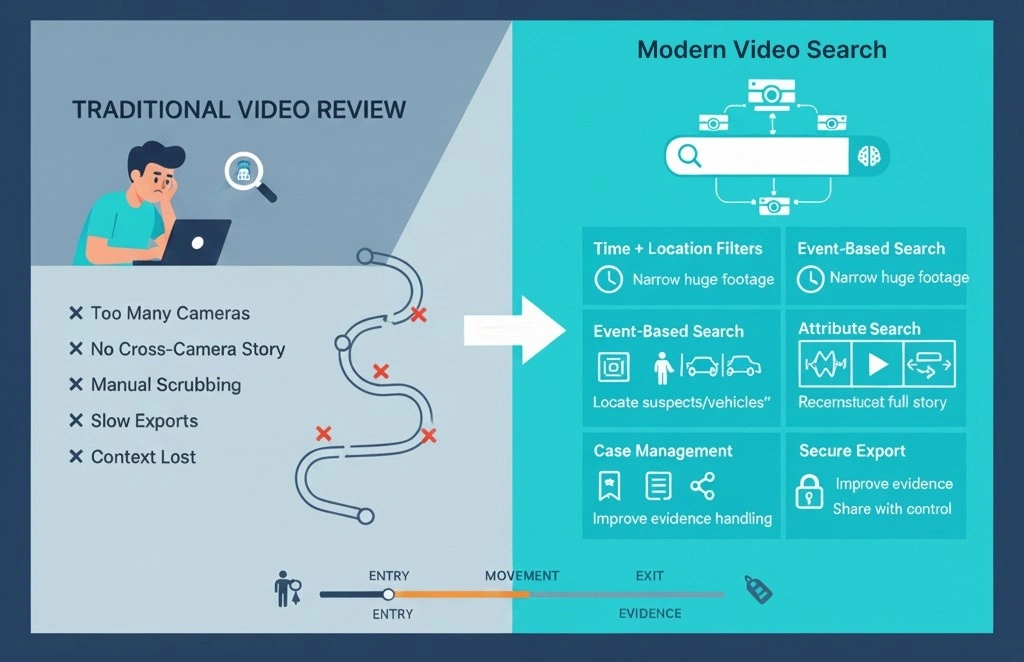
Traditional video review usually looks like this: someone guesses a camera, guesses a time, and then scrubs footage until something “looks right.” That works when you have a single camera and a small time window. It breaks instantly at scale.
The common reasons investigations get delayed:
➤ Too many cameras and too much footage
Large sites and multi-branch setups create days of video across dozens (or hundreds) of streams. Even a simple incident can require reviewing multiple angles.
➤ No cross-camera story
Incidents rarely happen in one place. A person enters from one gate, moves through corridors, crosses a parking area, and exits elsewhere. If playback isn’t synced across cameras, you lose the trail.
➤ Manual timeline scrubbing wastes hours
Most teams spend more time searching than actually investigating. Scrubbing is repetitive, inconsistent, and easy to get wrong.
➤ Exports are slow and messy
When evidence has to be shared, teams often create multiple clips, rename files manually, and send them through unsafe channels—without proper audit trails.
➤ Context gets lost
Notes, bookmarks, and case tags are often missing. That makes it hard to repeat an investigation, share findings, or defend the evidence later.
What “Comprehensive Video Search” Means in VSaaS
Comprehensive video search in a VSaaS platform means you can locate incidents by combining:
| Capability | What it means | Investigation value |
|---|---|---|
| Time + camera + location filters | Filter footage by exact time range, specific cameras, and site/zone | Quickly narrows huge footage into a manageable search window |
| Event-based search (analytics + system events) | Search using detected events (intrusion, loitering, line crossing) and system alerts (camera offline, tamper) | Finds important moments faster than manual scrubbing |
| Attribute-based search (person/vehicle properties) | Search by properties like person clothing color, vehicle type/color, direction, dwell time | Helps locate suspects or vehicles when you only have descriptions |
| Multi-camera synced playback | Play multiple camera feeds in sync at the same timestamp | Reconstructs the full incident story across zones and exits |
| Case management (bookmarks, notes, sharing, audit) | Save key clips, add notes/tags, share securely, track access history | Improves evidence handling, collaboration, and chain-of-custody |
The goal is simple: reduce time-to-evidence—from hours to minutes—without sacrificing accuracy. Instead of asking, “Which camera should I check?”, investigators can ask, “Show me all relevant moments that match this incident pattern.”
Core Capabilities That Make Video Search “Investigation-Ready”
1) Multi-Camera Timeline Intelligence
A strong VSaaS investigation experience starts with timeline clarity. Investigators should be able to:
View multiple cameras on a single timeline
Jump to the same timestamp across multiple feeds
Quickly move forward/backward in consistent time steps
See activity “density” (where motion/events are heavy)
This helps build a reliable sequence of events—especially when incidents move across zones.
2) Event-Based Search (The Fastest Way to Narrow Down Footage)
Event search turns investigations from a “needle in a haystack” problem into a targeted review.
Depending on what analytics are available, VSaaS platforms can let you search by events such as:
Intrusion / perimeter breach
Line crossing / entry-exit
Loitering / lingering
Crowd / occupancy threshold
Object left behind / removed
Speed or wrong-way movement (parking/campus/roads)
Safety events (restricted area access, unsafe movement patterns)
Even without advanced AI, system events matter too: camera offline, storage issues, tamper alerts, and motion spikes—these can quickly explain gaps or suspicious moments.
3) Attribute Search (Search Like You Describe)
Attribute search is where investigations become dramatically faster.
Instead of “replay everything,” you search using details like:
Person wearing “dark clothing” or “bright top”
Vehicle type (car, truck, bike) and color
Direction of movement (left-to-right, entry-to-exit)
Presence in a defined zone (loading bay, restricted door)
This is especially useful when the incident time is unknown, or when you only have a description from a witness.
4) Location and Zone-Aware Search
A real VSaaS deployment isn’t just cameras—it’s a map of zones: gates, docks, aisles, entrances, corridors, parking lanes, and high-risk areas. Comprehensive search becomes far more effective when you can filter by:
Site → building → floor → zone
Camera groups (Perimeter, Dock, Parking, Cash Counter, etc.)
Entry/exit pairs (to track movement flow)
It’s the difference between searching “all cameras” and searching “the 12 cameras that actually matter.”
5) Confidence Controls and False-Positive Management
Search is only useful if results are trustworthy.
Good platforms let investigators tune and filter results by:
Confidence thresholds
Minimum dwell time (reduces noise)
Object size filters (ignore tiny motion like shadows)
Zone masking (avoid trees/roads outside the perimeter)
This keeps teams from drowning in “almost relevant” clips.
6) Bookmarking, Notes, and Case Building
Investigations are rarely completed in one sitting, and they’re often shared across teams (security, operations, EHS, management, sometimes law enforcement). A strong VSaaS investigation workflow includes:
Bookmarks at key timestamps
Notes per clip or per case
Tags like “Entry”, “Suspicious behavior”, “Evidence”, “Follow-up”
A structured case timeline that can be reviewed later
This creates repeatability and accountability.
7) Evidence Export and Secure Sharing
Exporting evidence should not feel like a separate project. Look for:
Fast clip export with timestamps
Watermarking (optional, but useful)
Share links with permissions and expiry
Audit logs: who accessed what and when
Simple report generation for internal records
For many teams, this is the difference between a “useful system” and a system people actually rely on.
A Practical Investigation Workflow Using Comprehensive Video Search
Here’s how a real investigation should flow in a VSaaS platform:
Step 1: Start with what you know
Pick the site/location and approximate time window. If time is unknown, start with zones most likely involved (entry gates, docks, exits).
Step 2: Expand across nearby cameras
Add adjacent cameras and enable synced playback. You’re building coverage, not guessing one camera.
Step 3: Apply event filters
Use intrusion/loitering/line-crossing or motion spikes to reduce footage dramatically.
Step 4: Refine using attributes
Filter by person/vehicle properties. This is where you move from “many clips” to “likely clips.”
Step 5: Build the story
Confirm entry → movement → exit across multiple angles. Ensure timestamps align.
Step 6: Bookmark key moments and add notes
Mark the important 20–30 seconds, not hours of video. Add context and tags for easy sharing.
Step 7: Export and share with control
Generate clips or share links with permissions. Preserve audit trails.
Step 8: Close the case
Create a short case summary: what happened, when, where, who was involved (if known), and evidence links.
Real-World Use Cases Where Comprehensive Video Search Saves Time
➤ Theft and Shrinkage (Retail / Warehouses)
Investigators can search by time + dock zone + vehicle type + entry/exit events, instead of reviewing full shifts.
➤ Unauthorized Access (Factories / Campuses)
Use intrusion and restricted-zone events, then track movement across corridors and exits with synced playback.
➤ Vehicle Incidents (Parking / Logistics)
Filter by vehicle type, color, direction, and speed/wrong-way events to find the incident faster.
➤ Safety Incident Review (Industrial / Construction)
Search around the location and time, then narrow by zone activity and people presence to recreate the sequence.
➤ Dispute Resolution (Service Desks / Commercial Sites)
Use quick time filters, activity peaks, and bookmarks to produce clear evidence without delays.
Conclusion
Comprehensive video search turns VSaaS from “video storage” into a true investigation platform. Instead of wasting time scrubbing, teams can quickly filter, validate, and present evidence with confidence. The result is faster incident response, better accountability, and less operational disruption.
At Katomaran Technologies, we focus on building investigation-ready video platforms that help teams search smarter, not harder—across cameras, sites, and timelines.

Dinesh Kumar
SEO Analyst
Dinesh Kumar is an SEO Analyst at Katomaran Technologies, writing search-optimized content on AI video analytics, VMS, intelligent surveillance, and IoT-driven technology solutions.