
Introduction
VSaaS (Video Surveillance as a Service) platforms are built for one promise: anytime, anywhere access to live and recorded video—with centralized health monitoring, alerts, and analytics. But in real deployments (warehouses, factories, retail chains, construction sites), there’s a common infrastructure headache:
Most sites don’t have a static public IP.
And even if they do, it often comes with higher monthly cost, slower ISP provisioning, and rollout delays.
That’s where Dynamic DNS (DDNS) becomes a practical alternative. DDNS can help VSaaS deployments achieve stable remote access using a hostname that automatically updates when the site’s IP changes—reducing cost and improving rollout speed. But it also changes how you handle security, reliability, and support.
This blog breaks down the real impact of DDNS in VSaaS platforms—and when static IP is still the better option.
Static IP vs Dynamic DNS in VSaaS
| Topic | Static IP (VSaaS) | Dynamic DNS (DDNS) (VSaaS) |
|---|---|---|
| Meaning | A fixed public IP address that does not change | A hostname/domain that automatically points to the latest public IP |
| What changes over time | IP stays the same | Public IP can change, but the hostname stays the same |
| Common use in VSaaS | Remote access to NVR/VMS/Edge server | Remote access using a stable hostname |
| Cloud-to-site connectivity | Simple and stable routing | Stable routing via hostname that updates automatically |
| Enterprise allowlisting | Easy (clients can allowlist a fixed IP) | Harder (IP may change; allowlisting becomes unreliable) |
| Third-party integrations | Easier due to fixed endpoint | Possible, but depends on hostname support and update timing |
| Deployment speed | Often slower (ISP provisioning needed) | Faster (no need to wait for static IP approval) |
| Cost | Usually higher monthly cost | Lower cost (often free/low cost DDNS options) |
| Reliability | Very predictable | Depends on DDNS update speed + DNS propagation |
| Key limitation | Cost + dependency on ISP | Doesn’t solve CGNAT; may need VPN/tunnel for secure access |
Why Static IP Becomes a Bottleneck in Real VSaaS Rollouts
In single-site pilots, static IP might feel simple. In multi-site reality, it becomes a scaling blocker.
1) Higher cost per location
Static IP typically requires a business plan or add-on. Multiply that across 50 or 500 sites and the recurring cost becomes significant.
2) Slower onboarding
Waiting for ISP approvals, plan upgrades, or network changes delays go-live dates—especially when your deployment team is ready but networking isn’t.
3) Poor flexibility
If a client changes ISP or router, static IP setups often need rework: NAT rules, documentation, security policies, and whitelists.
4) Scaling pain
A platform needs a repeatable deployment pattern. Static IP introduces variable dependencies site-by-site.
How DDNS Fits Into a VSaaS Architecture
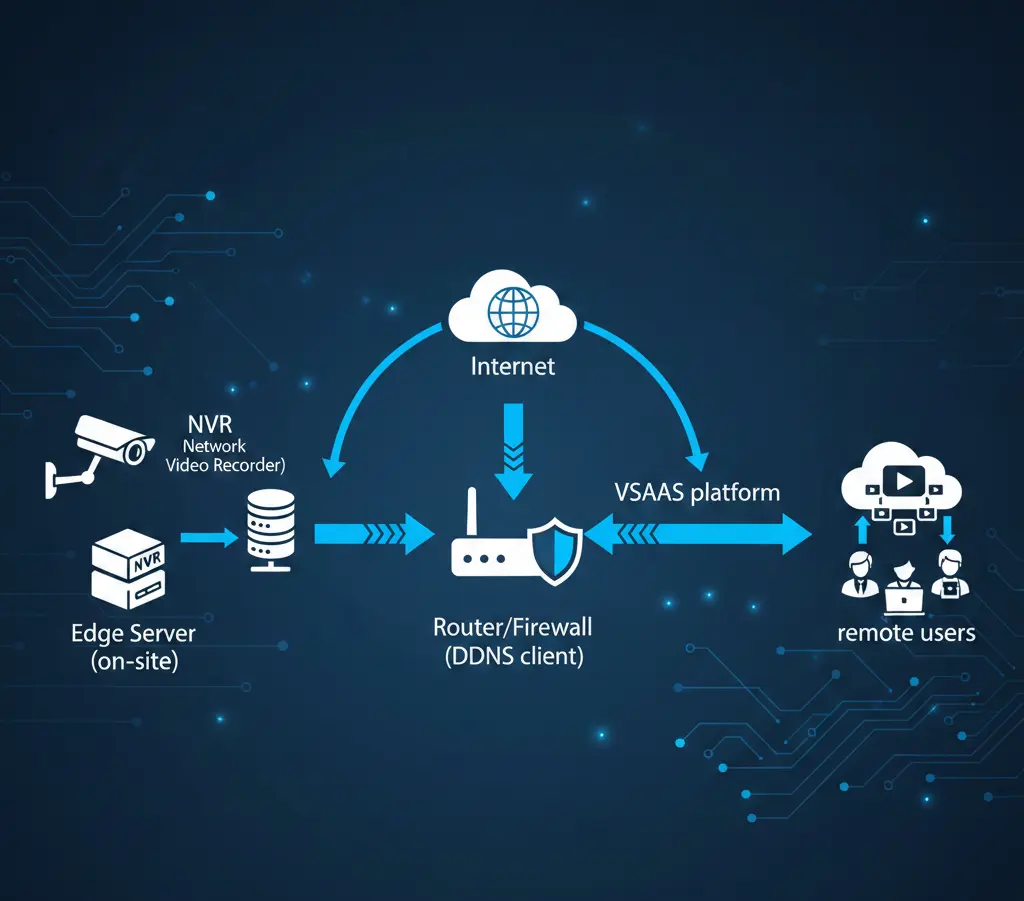
Here’s a typical simplified flow:
Camera/NVR/Edge Server (on-site) → Router/Firewall (DDNS client) → Internet → VSaaS platform / remote users
The Real Impact of Using DDNS Instead of Static IP
1) Faster deployments and quick onboarding
This is the biggest advantage. With DDNS, your rollout becomes repeatable and simple:
Install the router/gateway
Enable DDNS updates
Assign a site hostname in the VSaaS platform
Apply analytics rules and profiles
In most cases, you can go live without waiting for the ISP to provide a static IP.
2) Lower operating cost at scale
DDNS reduces recurring expenses by avoiding paid static IP plans. It also removes the repeated effort of requesting, tracking, and managing static IPs for every new site.
3) Easier multi-site standardization
VSaaS success depends on consistency. DDNS lets you reuse the same deployment model across many locations, such as:
Warehouses
Retail outlets
Clinics and hospitals
Schools
Construction sites
4) Better remote support and maintenance
DDNS improves day-to-day support because teams can always connect using the same hostname. This simplifies:
Remote troubleshooting
Health checks
Firmware upgrades
Edge-server maintenance
Port and latency diagnostics
5) Smoother handling of ISP changes
If the site’s ISP changes or the public IP gets updated often, DDNS keeps the hostname stable. That means fewer service interruptions and less reconfiguration work for your team.
Conclusion
Dynamic DNS (DDNS) is a cost-effective way to replace static IP in many VSaaS deployments. It helps you onboard sites faster, scale across locations, and keep a stable hostname even when the public IP changes. This also makes remote support easier for your team.
But DDNS won’t fit every case. If the site uses CGNAT, needs strict IP allowlisting, or requires a permanently fixed endpoint, a static IP or a VPN/tunnel setup is a better option.
Best practice: Use DDNS for faster rollouts, and pair it with a secure access method (VPN/zero-trust or outbound tunnel) for enterprise deployments.

Dinesh Kumar
SEO Analyst
Dinesh Kumar is an SEO Analyst at Katomaran Technologies, writing search-optimized content on AI video analytics, VMS, intelligent surveillance, and IoT-driven technology solutions.