Why Pure On-Premise or Pure Cloud Is Often Not Enough
Most video management decisions get framed as a binary choice: keep everything on-premise, or move everything to the cloud. In practice, neither option holds up well once you look at how organizations actually operate across multiple sites.
Pure on-premise recording keeps footage local and under direct control, which matters for compliance and forensic reliability. But it comes with a real cost. Each site needs its own recording infrastructure, its own IT oversight, and its own process for retrieving footage. If a facility manager wants to check a camera at a branch three states away, someone has to physically access that site's system, or IT has to configure remote access site by site. For organizations running more than a handful of locations, this becomes a genuine operational burden.
Pure cloud recording solves the remote access problem but introduces a different set of constraints. Streaming continuous high-resolution video from every camera to the cloud requires substantial, consistent bandwidth. In much of India, internet reliability still varies significantly by location a factory on the outskirts of an industrial corridor may not have the same connectivity as a corporate office in a metro city. Cloud-only recording also raises data sovereignty questions for organizations in regulated sectors, where footage needs to stay within specific jurisdictions or under direct organizational control rather than a third-party cloud provider.
Our earlier comparison of on-premise VMS against VSaaS goes deeper into these trade-offs. The short version: each model solves a real problem and creates a new one. Hybrid architecture exists because most organizations need the strengths of both without fully committing to either extreme.
What Hybrid VMS Architecture Actually Means
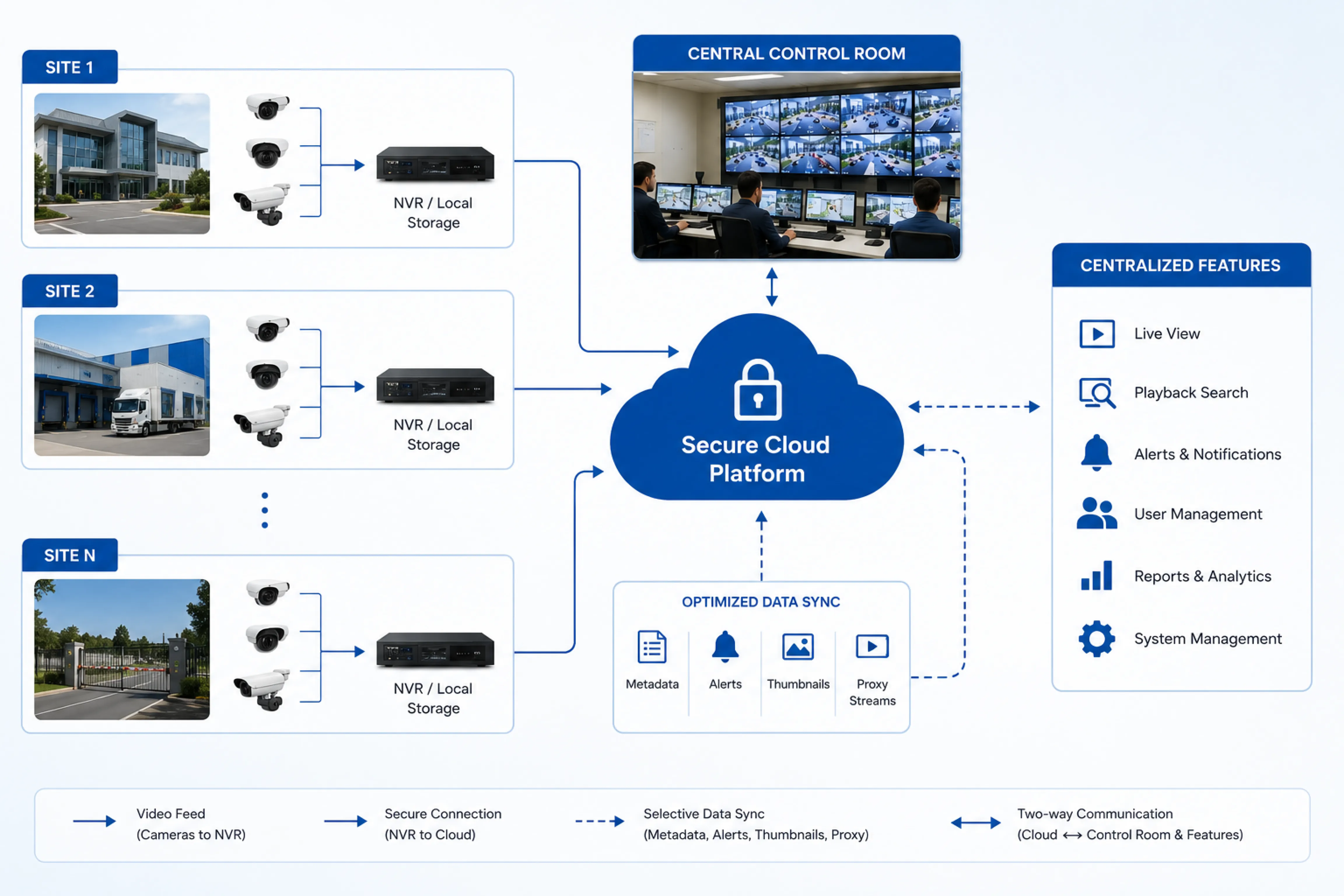
Hybrid VMS architecture keeps video recording and primary storage on-premise, at the site where cameras are installed, while adding a cloud layer for remote access, centralized management, and cross-site visibility.
The recording itself doesn't depend on internet connectivity. Cameras write to local storage the same way they would in a fully on-premise deployment. What changes is what happens on top of that recording layer a cloud-connected service that gives authorized users the ability to view live feeds, receive alerts, and search footage from any location, without needing a direct network connection into each site.
This is a meaningfully different model from cloud recording. In hybrid architecture, the cloud isn't the primary storage location. It's a management and access layer sitting above local recording infrastructure that already exists and continues to function independently.
Core Components of a Hybrid Setup
On-Premise Recording and Local Storage
At the site level, cameras connect to a local NVR or recording server, exactly as they would in a standalone deployment. Recording continues regardless of internet status, which matters more than it might initially seem; a power fluctuation or a temporary connectivity drop shouldn't mean lost footage during exactly the window when something happened.
Local storage also keeps full-resolution footage available for forensic review without depending on cloud bandwidth to retrieve it. For organizations managing large camera counts, this is often the more practical approach to storage cost as well, since local disk space is generally more economical at scale than continuous cloud storage. Our overview on video management systems for large enterprises covers how this scales when camera counts run into the hundreds or thousands across a single organization.
Cloud Access and Remote Management Layer
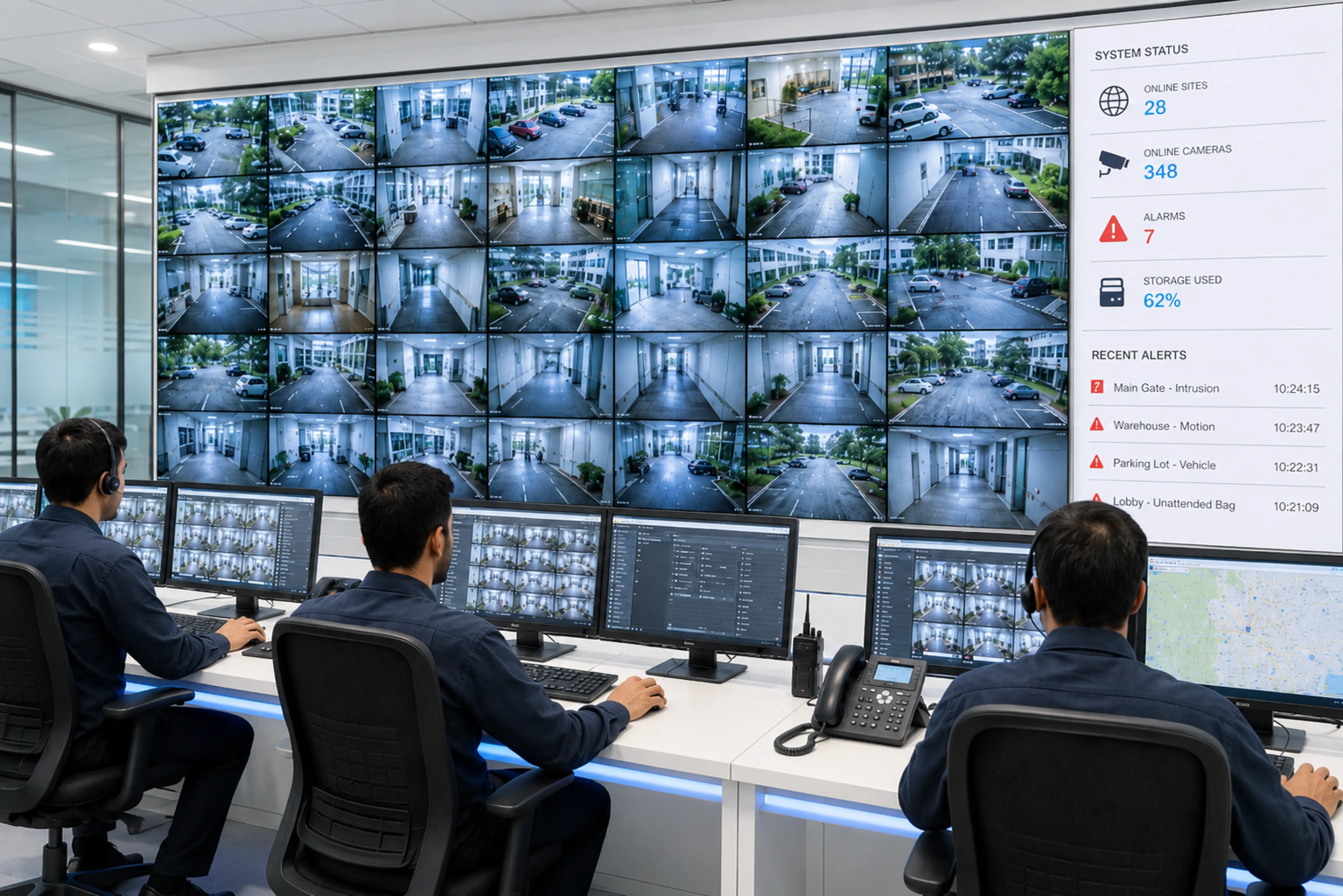
The cloud component handles what on-premise systems traditionally struggle with remote visibility and centralized control across multiple sites. Rather than logging into each site's local system separately, authorized users get a single interface for live viewing, alerts, and footage search across every connected location.
This layer typically draws on the same underlying principles as VSaaS, even though the recording model is different. The value is similar: centralized visibility without requiring a person physically present at each site to check on cameras or retrieve footage on request.
Data Synchronization and Bandwidth Management
This is the part that determines whether a hybrid deployment actually works well in practice. Rather than streaming full raw footage continuously to the cloud, most hybrid systems sync selective metadata, event alerts, thumbnails, and lower-resolution proxy streams for quick remote review; while full-resolution footage stays on local storage until specifically requested.
Getting this right requires understanding each site's actual bandwidth availability, not assuming uniform connectivity across locations. A site with a stable leased line can handle more continuous cloud interaction than a remote facility on a variable broadband connection. Network configuration also plays a role here; our piece on dynamic DNS versus static IP for VSaaS deployments covers some of the practical networking decisions that affect how reliably a site connects to its cloud layer.
Key Benefits of Combining On-Premise Recording with Cloud Access
The core benefit is resilience paired with visibility. Recording doesn't stop when connectivity drops, which matters for sites where internet reliability isn't guaranteed. At the same time, teams get remote access without the overhead of maintaining VPN connections or granting direct network access into every location.
Bandwidth costs are generally lower than a full cloud-recording model, since only a fraction of the total video data needs to move off-site. Full-resolution footage remains available locally for detailed forensic work, while the cloud layer handles the day-to-day need for quick remote checks and alerts.
For organizations running multiple sites, this model also supports centralized oversight without requiring every site to be re-architected around cloud infrastructure. A multi-site VMS setup that brings several locations into one control room can layer hybrid access on top of existing on-premise recording at each site, rather than replacing it outright.
Practical Challenges in Hybrid Deployments
Hybrid architecture isn't a simpler system, it's two systems working together, and that coordination introduces its own complexity.
Synchronization needs monitoring. If a site's connection drops for an extended period, someone needs to know that cloud visibility for that location has gone stale, even though local recording is unaffected. Storage management also needs attention at each site individually, since local retention policies determine how far back an investigation can search before footage is overwritten.
Mixed camera fleets add another layer of complexity. Many Indian facilities have accumulated cameras from different vendors over time, and not every combination of hardware and hybrid software behaves identically when it comes to metadata tagging or proxy stream generation. Security also needs attention on both sides: local systems still need proper access control, and the cloud layer needs its own authentication and encryption practices, since it's now an additional entry point into the overall system.
Cost planning gets more involved as well. Hybrid deployments carry both the capital cost of local recording infrastructure and the ongoing operational cost of a cloud subscription, so the total cost of ownership needs to be evaluated as a combination rather than assuming it's cheaper than either pure model by default.
Total Cost of Ownership (TCO) Comparison: On-Premise Recording vs. Cloud Access vs. Hybrid VMS
| Criteria | On-Premise Recording | Cloud Access (VSaaS) | Hybrid VMS |
|---|---|---|---|
| CapEx / OpEx | High upfront cost for recording infrastructure and IT oversight at every site | Low CapEx, but recurring OpEx. Low upfront cost, but bandwidth and subscription costs scale with camera count and resolution | Balanced spend; upfront for core infra, OpEx for cloud extensions. Capital cost for local recording infrastructure, plus a smaller ongoing cost for the cloud access layer |
| Remote Access to Footage | Requires physically accessing the site's system, or IT configuring remote access site by site | Built in by default, since footage lives in the cloud from the start | Available through the cloud layer without needing a direct network connection into each site |
| Dependency on Internet Connectivity | None — recording is entirely local and unaffected by outages | High — recording itself can be disrupted if upload bandwidth drops | Recording continues locally regardless of connectivity; only remote visibility is affected until the connection returns |
| Bandwidth Requirements | Not a factor for recording, since footage never leaves the site | Substantial and continuous, since every camera streams full-resolution video to the cloud | Lower than full cloud recording — only metadata, alerts, thumbnails, and proxy streams typically sync, while full-resolution footage stays local |
| Data Sovereignty & Compliance | Full control — footage stays within the organization's own infrastructure and jurisdiction | Depends on the provider's infrastructure and data-handling policies | Primary footage stays on local infrastructure under direct control, while the cloud handles only access — better suited to regulated sectors |
| Maintenance & IT Oversight | Each site needs its own recording infrastructure and local IT oversight | Largely managed by the provider, minimal on-site effort | Local recording hardware still needs on-site upkeep; the cloud layer is managed separately |
| Scalability Across Multiple Sites | Adding sites means procuring and maintaining hardware separately at each one | Straightforward to extend to new sites, largely a configuration exercise | Centralized oversight without needing to re-architect every site around cloud infrastructure |
| Retrieval Speed for Forensic Review | Fast for local footage, since full-resolution recordings sit on-site | Depends on available bandwidth, particularly for older or high-resolution footage | Full-resolution footage retrieves quickly from local storage; cloud handles fast preview via lower-resolution proxies |
| Long Time Cost Curve | Predictable after CapEx, but high upfront investment | Lower entry cost, but OpEx may surpass CapEx over time | Optimized cost balance; scale without overspending |
When Hybrid Architecture Makes the Most Sense
Hybrid architecture tends to fit best for organizations that need centralized oversight across multiple locations but can't rely on consistent, high-bandwidth connectivity at every site. This describes a large share of Indian manufacturing groups, retail chains, and campus operators, where site quality and infrastructure vary considerably.
It also fits well for remote or industrial sites where full cloud recording isn't practical due to bandwidth or cost, but where management still wants visibility without deploying staff on-site. Our coverage of VSaaS for remote industrial monitoring touches on similar connectivity constraints, even where the underlying recording model differs.
Organizations with compliance or data sovereignty requirements where footage needs to stay on local infrastructure rather than a third-party cloud environment are often better served by hybrid architecture than a pure cloud model, since primary storage and retention remain fully within their own control.
Implementation Considerations Before You Decide
Before committing to a hybrid deployment, a few things are worth evaluating honestly.
Start with actual network conditions at each site, not assumptions. Bandwidth availability determines what sync strategy is realistic: continuous proxy streaming for well-connected sites, and event-based sync only for sites with limited connectivity.
Local storage sizing needs to match retention requirements, factoring in camera count, resolution, and how long footage typically needs to be retrievable before an investigation would reasonably start. IT capability at each site also matters; someone needs to be able to maintain local recording hardware, even if day-to-day monitoring happens centrally.
Finally, evaluate vendor support for hybrid configurations specifically, rather than assuming a system built primarily for cloud or on-premise deployment can be adapted without gaps. Not every video management system handles the on-premise-plus-cloud combination equally well. Katomaran Video Management System is built to support complete on-premise, cloud, and hybrid deployments, giving clients the flexibility to deploy the solution based on their infrastructure, security policies, and business requirements.
Closing Thoughts
Hybrid VMS architecture exists because most organizations' actual operating conditions don't match the assumptions behind a purely on-premise or purely cloud approach. Recording stays reliable and local, while cloud access solves the real, everyday problem of needing visibility across sites without physically being there.
If you're managing multiple locations with inconsistent connectivity and are weighing how much to centralize versus keep local, it's worth mapping out actual bandwidth and storage requirements site by site before choosing an architecture.
Our team at Katomaran is glad to walk through what that would look like for your specific site mix.
Frequently Asked Questions
1. What is hybrid VMS architecture?
Hybrid VMS architecture keeps video recording and primary storage on-premise at each site, while adding a cloud layer for remote access, alerts, and centralized management. Recording continues locally regardless of internet status, while the cloud handles visibility across sites.
2. How is hybrid architecture different from cloud-based VSaaS?
In VSaaS, the cloud is typically the primary storage and access model. In hybrid architecture, the cloud is a management layer sitting on top of on-premise recording, which remains the primary storage location. Footage stays local unless specifically synced or requested.
3. Does hybrid VMS still work if a site loses internet connectivity?
Yes. Recording continues on local storage independent of the internet connection. Only remote visibility and cloud sync are affected during an outage footage isn't lost, though live cloud access to that site is temporarily unavailable until connectivity returns.
4. How much bandwidth does a hybrid VMS setup require?
Less than a full cloud-recording model, since only a portion of the data metadata, alerts, thumbnails, and lower-resolution proxy streams typically syncs to the cloud. Full-resolution footage stays on local storage unless a specific clip is requested.
5. Is hybrid architecture suitable for sites with unreliable internet connections?
Yes, this is one of the main reasons organizations choose it. Recording isn't dependent on connectivity, so sites with variable or unstable internet still get reliable local recording, with cloud visibility resuming once the connection stabilizes.
6. Does hybrid VMS help with data sovereignty or compliance requirements?
It can, since primary footage stays on local infrastructure under the organization's direct control rather than a third-party cloud environment. This matters for regulated sectors where footage needs to remain within specific jurisdictions or systems.
7. Is a hybrid deployment more expensive than a fully on-premise or fully cloud system?
It typically involves both the capital cost of local recording hardware and an ongoing cloud subscription cost, so total cost of ownership should be evaluated as a combination. It isn't automatically cheaper than either pure model the value comes from matching the architecture to actual site conditions rather than upfront cost alone.

Eswaravel Ekambaram
Co-Founder & COO
Eswaravel Ekambaram is Co-Founder & COO of Katomaran Technologies, driving operations, system architecture, and enterprise deployment of AI video analytics, VMS, and IoT solutions.