Introduction
Two requirements pull video system design in opposite directions. Recording has to be dependable. Footage must be written continuously, at full quality, whether or not the site's link is working that morning. Access has to be convenient. A regional manager in another city and a central team covering several sites both want playback without driving out.
A fully local system does the first well and makes the second awkward. A fully cloud system does the second well and leaves the first resting on an uplink that, at many Indian sites, is neither fast nor consistent. Factories at the edge of industrial estates run on whatever the single available provider delivers.
Hybrid VMS architecture is our answer to that tension. We record locally and expose a controlled view through the cloud. The design work is deciding what goes up, for whom, and under which conditions.
What Hybrid VMS Architecture Actually Means
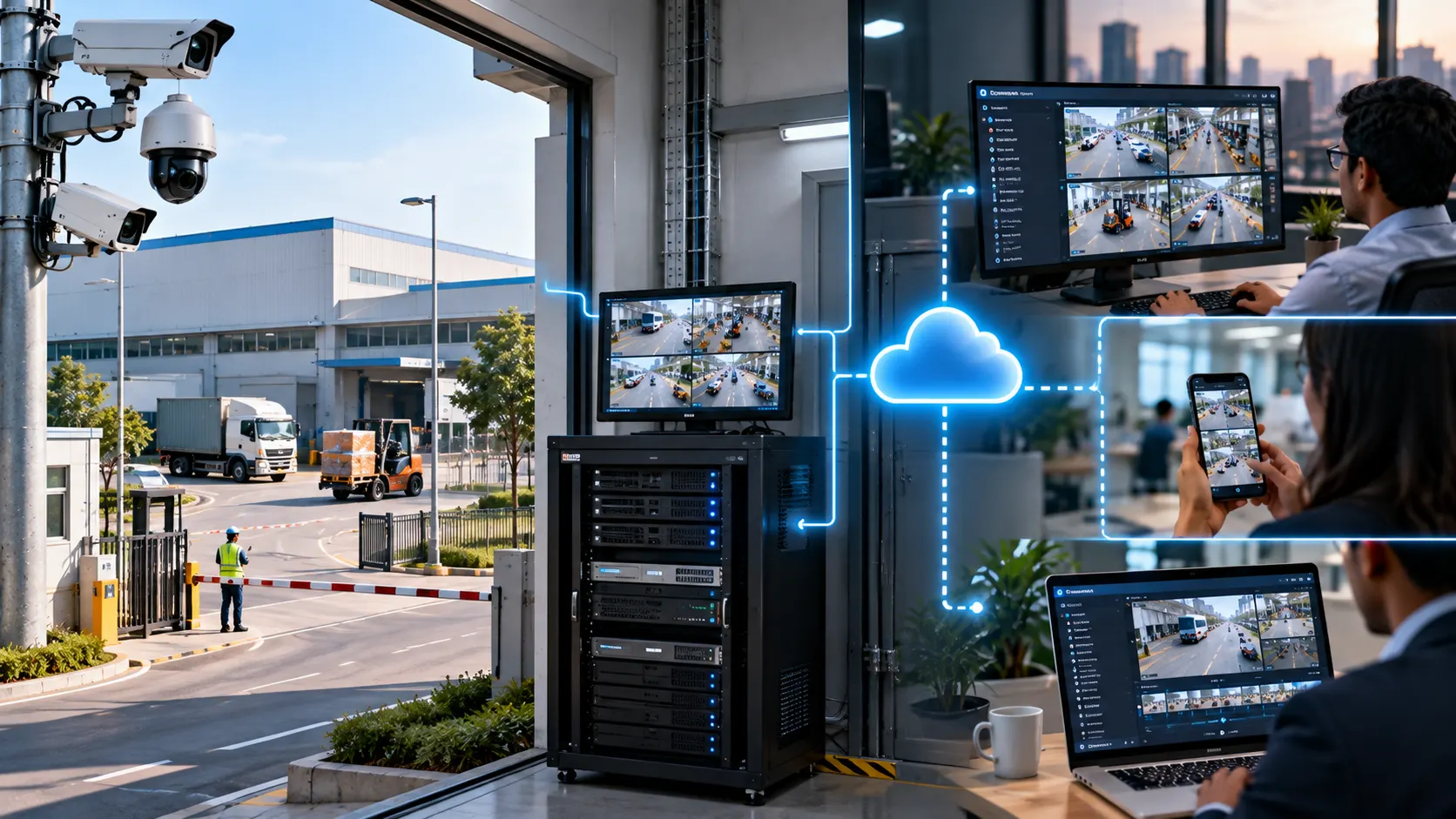
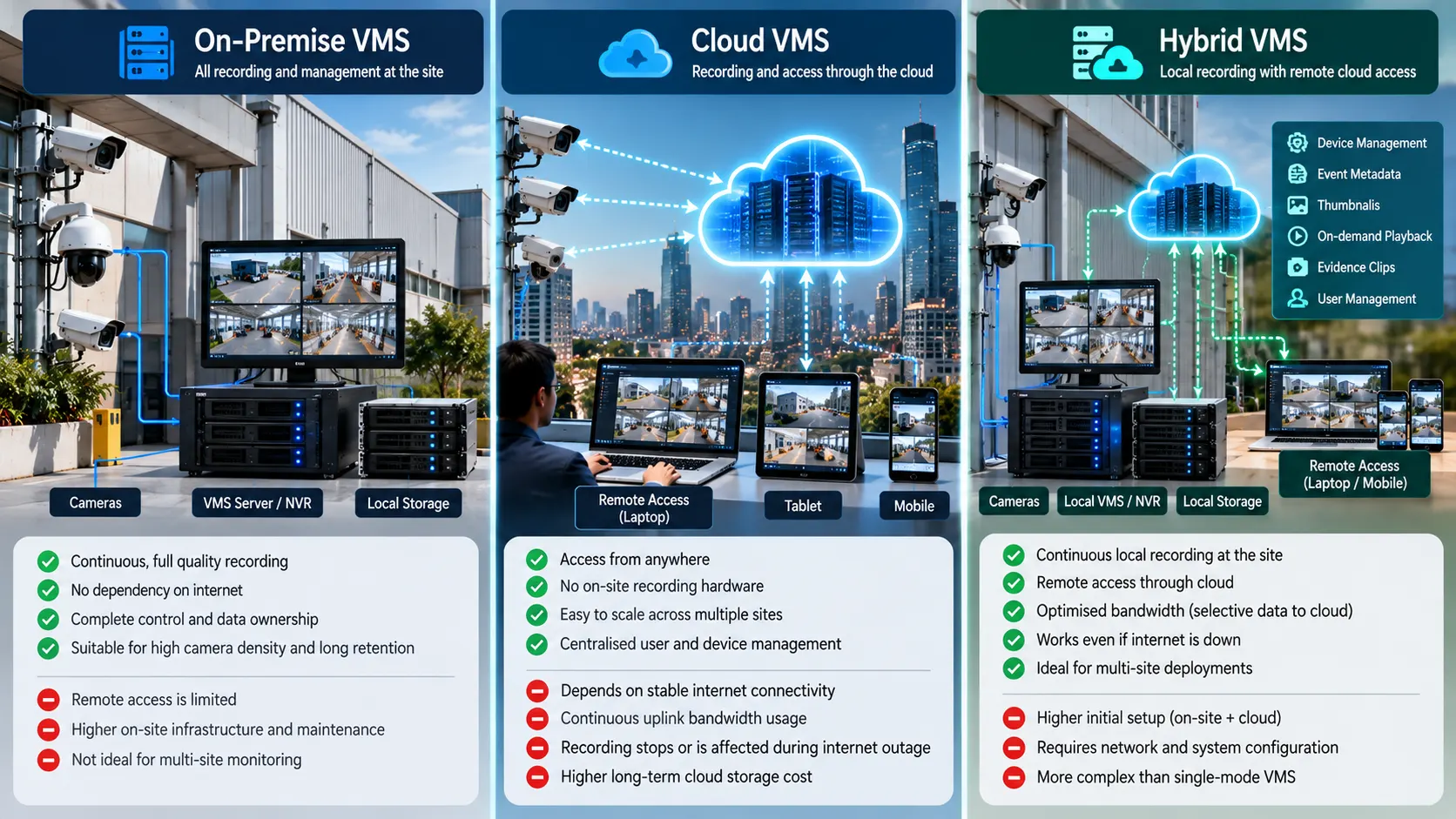
In a hybrid video management system, each site keeps its own recording layer. Cameras stream to a local server, NVR, or edge appliance, which writes continuous video to local storage for the full retention period. That layer runs whether or not the WAN link is up.
Alongside it runs a cloud access layer, which carries:
- a device and site inventory with health status
- event metadata, with thumbnails
- live view and playback on demand, pulled from the site when a user asks
- clips uploaded as evidence, plus user accounts, roles, and audit logs
On-premise recording is continuous and complete. Cloud access is selective and on demand. Edge recording with cloud access keeps the constant work at the site, while the cloud carries what people ask to see. We enable that per camera, never estate-wide.
When Pure On-Premise Is Still the Better Fit
Hybrid suits many sites. It suits some badly. We keep everything local when one or more of these applies.
Data residency or policy restrictions - Defence establishments and some government facilities prohibit video leaving the premises. Local is then the only answer.
Air-gapped environments - Some industrial control networks are deliberately isolated, and an uplink for a VMS would weaken the design the plant was built around.
Limited or unreliable WAN - On a thin or congested link, cloud access frustrates users every time. Stay local until connectivity improves.
High camera density with long retention - Several hundred cameras at ninety day retention produce a volume that belongs on local storage, where cloud economics rarely work.
A single site with everyone on it - When the people who view video already work in the building, remote access answers a question the site is not asking. Our guide to VMS design for large enterprises covers what such a deployment needs.
When Pure Cloud Access Creates Operational Friction
The opposite extreme has its own costs, most of them surfacing months after handover.
Continuous uplink consumption - Sending every camera to the cloud around the clock needs sustained upstream bandwidth at each site, and consumer-grade broadband rarely guarantees it.
Recording that depends on the internet - When the link drops, cloud recording stops unless an edge buffer is in place. Buffering helps, though recovery has to be verified.
Latency during review - Investigations mean scrubbing through hours of footage. Over a modest link that is slow enough to change behaviour, operators start limiting what they review.
Power events - Where supply is unstable, a site can lose its router while cameras and a recorder on a UPS keep running. A local layer records through that window; a cloud-only design loses the footage.
Our comparison of VMS and VSaaS models sets out the trade-offs.
The Hybrid Decision Framework
We work through four questions, in order.
1. Which sites need local recording?
Almost all do. The exceptions are small sites with few cameras, short retention, and a stable link.
2. Which cameras need full quality local retention, and for how long?
Retention is rarely uniform. Entry gates and dispatch bays usually need longer than corridors and parking, and setting it per camera group keeps local storage sized sensibly.
3. What goes to the cloud, and how often?
Three ways:
- Always: device health, event metadata, thumbnails, and audit logs. Small payloads, and the basis of centralised monitoring across sites.
- On demand: live view and playback, for the length of a session.
- Selectively: clips tied to events, and a sub stream where offsite copies matter.
4. Who needs access, and to what?
Site staff need full access for their own location. Supervisors need several sites with review rights. Auditors may need read only access for a defined period. Each role puts a different load on the uplink, which is where cloud cost is set.
Core Components of a Working Hybrid Design
Local Recording and Storage Layer
This is the part that must never stop, and the core of any video management system deployment. We size it on sustained write throughput as well as capacity: a recorder that holds ninety days of video can still drop frames if the disks cannot absorb the write rate during playback.
Practical points we apply:
- surveillance-rated drives, with capacity planned at peak bitrate
- RAID chosen so recording continues during a rebuild
- the operating system and database on drives separate from video
- UPS backing for the recorder, switch, and cameras, with clean automatic restart
- Local time synchronisation, so timestamps hold when the link is down
Cloud Access and Management Layer
This layer handles sign-in, roles, device inventory, health dashboards, event feeds, and updates across sites. It should work on a browser and a phone, since users are usually away from a desk.
It must stay useful when a site is offline: the site shows as unreachable with its last seen time, and the rest of the estate keeps running. Our VSaaS page describes this layer as we build it.
Bandwidth and Stream Management
Hybrid designs succeed or fail here. The techniques we rely on:
- Sub streams for remote viewing: Remote users get a low-resolution stream by default, with full quality for one camera at a time, on request.
- On-demand playback: Recorded video leaves the site only when someone asks for it.
- Rate limits per site: An upper bound on uplink usage keeps video from starving other business traffic, and clip uploads run outside working hours.
- Outbound connections: The site connects out, so no inbound ports or static IPs are needed. Many Indian ISPs place customers behind CGNAT, which makes inbound access impossible anyway
User Access and Role Control Across Sites
One account directory across the estate, with roles covering what a person can do and which sites they can do it on. Viewing, playback, export, and configuration are separate rights, because export carries legal weight. Every action belongs in an audit log: who logged in, which cameras they viewed, what they exported, and when. That record is usually the first thing an auditor asks for. We cover the centralised view in our article on multi-site VMS centralisation.
Health Monitoring and Failover Behaviour
More moving parts means more to watch: camera and recorder status, storage capacity and write errors, link quality, UPS state, and recording continuity per camera.
Failover behaviour should be explicit and documented:
- link down: the site keeps recording, buffers events, and resynchronises when the link returns
- recorder down: an alert reaches site staff and the central team immediately
- cloud layer unavailable: local users carry on from the local interface
- camera offline: the gap is logged with start and end times
Practical Deployment Patterns We See
A single large campus with remote supervisors: A plant or hospital records everything locally, with the control room on site. Senior managers and corporate security reach live view and playback through the cloud, so the uplink carries only what those few users request.
Multi-site operations with central review: Retail chains and logistics networks run a recorder at each site and a central team working from the cloud layer. That team watches health status daily and pulls footage when an incident needs review. Consistent configuration matters most here, because an operator covering fifty locations cannot hold fifty layouts in mind. Faster retrieval is the practical gain, covered in our article on reducing video footage search time.
Sites with intermittent connectivity: Mining operations, remote substations, and construction sites record locally and synchronise opportunistically. Metadata goes up when the link allows, full video stays local, and playback may queue. They work well when the design admits the connectivity on hand.
Operator Workflow and Evidence Handling
A hybrid design should feel like one system, even though footage lives in two places. An operator opens the site list, sees health status, and reviews recent events with thumbnails. Opening a camera starts a live session at sub-stream quality, and playback goes as a request to that site's recorder. The interface should show when video is being retrieved and when a site is unreachable, so the operator is never left guessing.
For evidence, we follow a fixed sequence:
1. Identify the segment through the event list or a time-based search.
2. Mark it protected at the site, so retention leaves it alone while the case is open.
3. Export the clip into the cloud layer under the case.
4. Record who exported it, when, and from which camera, with a hash on the file.
5. Share it through a controlled link.
Teams skip step two more often than any other, and retention then overwrites the footage an investigation needs.
Cost, Complexity, and Operational Trade-Offs
Hybrid designs carry real costs. Here they are.
Two layers to run: Local recorders need patching, disk replacement, and periodic checks. The cloud layer needs account management and access reviews. Ownership of each belongs in the contract.
Storage planning stays local: Cloud access changes nothing about sizing site storage; retention, bitrate, and camera count set disk capacity.
Network design becomes part of the project: Upstream bandwidth, link reliability, and traffic priority need assessment during design. Finding them out after go-live is expensive.
Mixed cost structure: Local hardware is capital expenditure with a refresh cycle; cloud access is a subscription. Finance teams should see both.
What hybrid buys is a recording layer that survives link and power failures, and an access layer that lets a small team cover many locations.
Conclusion
A hybrid video management system is worth building when two conditions hold: recording must stay dependable through local power and network conditions, and people away from the site genuinely need access. Where both are true, a local recording layer with a cloud access layer is sound engineering. Where only one is true, a simpler design costs less.
If you are weighing this choice, we would be glad to look at your camera counts, retention needs, and link quality, and talk through where the split makes sense.
Frequently Asked Questions
1. Does a hybrid VMS still record when the internet fails?
Yes. Recording runs on the local server or recorder with its own storage, so it continues through a link outage. Only remote access pauses, and metadata resynchronises once connectivity returns.
2. How much upstream bandwidth does cloud access need?
Concurrent viewers drive it, so camera count matters less than people expect. We size the uplink for the realistic peak of simultaneous remote sessions, with headroom left over for clip uploads.
3. Can we keep our existing cameras and recorders?
Usually yes, where devices support ONVIF or RTSP. We assess the estate first, because older recorders sometimes limit the event metadata available, which affects what the cloud layer can usefully show.
4. Where should video evidence be stored in a hybrid setup?
Original footage stays at the site for its retention period. Exported clips go to the cloud layer with access logs and hashes. We mark the source segment as protected first, so retention never overwrites it.
5. Is hybrid more expensive than a fully local system?
It adds a subscription on top of site hardware. Whether it costs more overall depends on what it replaces, such as site visits, separate monitoring stations, or staff travelling between locations to review footage.
6. How do we decide which cameras get cloud access?
We map it to who needs to see what. Cameras reviewed only by site staff need no cloud exposure. Cameras that central teams, supervisors, or auditors check routinely are the ones worth making remotely available.

Caldwell Simon
Project Head
Caldwell Simon, Project Head at Katomaran Technologies, writes on AI video analytics, VMS, IoT integration, and large-scale surveillance deployment and delivery.